


Your doctor, your recordsand your health, in one app
Book a doctor, check in from your phone and see your token move. Consult in person or by video, then keep every prescription, report and bill in one private record that you control.
Already have an account? Log in
Private by design, connected to India's health stack
- Sign in or sign up with ABHA
- ABDM consent-based sharing
- You decide who sees your records
- Video calls are never recorded
- Install it on your home screen
- Privacy policy aligned to the DPDP Act, 2023
Every part of your care,on your phone
Appointments, video visits, records and the people who look after you, connected to the hospitals and clinics that run on MedChaaya.
- Book and check in
Appointments and live token
Find a doctor, book a slot, check in from your phone and see how many patients are ahead of you.
Explore appointments - Consult from home
Video consultations
A waiting room with a device check, a ring when the doctor admits you, and call-back requests.
How video visits work - Your medical history
Health records
Prescriptions, reports, bills, admissions, vaccinations and your own documents, in one place.
See your records - ABHA and family
ABHA, consent and family
Create your ABHA, share records only with consent, and let family see what you choose.
Family and caregivers
- Find a doctor
- Book a slot
- Live token
- Video visits
- Prescriptions
- Medicines
- Lab reports
- Bills
- ABHA
- Vaccinations
- Wellness
- Family sharing
Everything a visit needs, before, during and after
01 / 07
- 01Find and book
Find the right doctor and book a slot without a phone call
- Search by name, specialty or department, or show video doctors only
- See the languages each doctor speaks, the next free slot and the video fee
- Book in person or by video, add a note, reschedule or cancel
- Book the follow-up your doctor recommended
- 02Check in
Check in from your phone and watch your token move
- Self check-in, and enter your vitals before you see the doctor
- Your token number and how many patients are ahead of you
- The live queue refreshes on its own every 30 seconds
- Today's visit, stage by stage, from check-in to the bill
- 03Video consultation
See your doctor by video, from wherever you are
- A three-step waiting room: consent, camera and mic check, then wait
- See when you are next; the doctor admits you and your phone rings
- Send a call-back request and your doctor calls you
- Pay the video fee online when you book
- 04After the visit
Know which medicine to take, and when
- Every prescription with dose, schedule, duration and instructions
- Today's doses by morning, afternoon and night
- Mark each dose as taken, so your doctor can see how it is going
- Download any prescription as a PDF
- 05Reports and bills
Reports reach you once they are approved
- Lab results with reference ranges, flagged when out of range
- Radiology reports with image thumbnails
- Every bill with its line items, discount and net amount
- Download reports and bills whenever you need them
- 06National health ID
Create your ABHA in the app, and carry your records with you
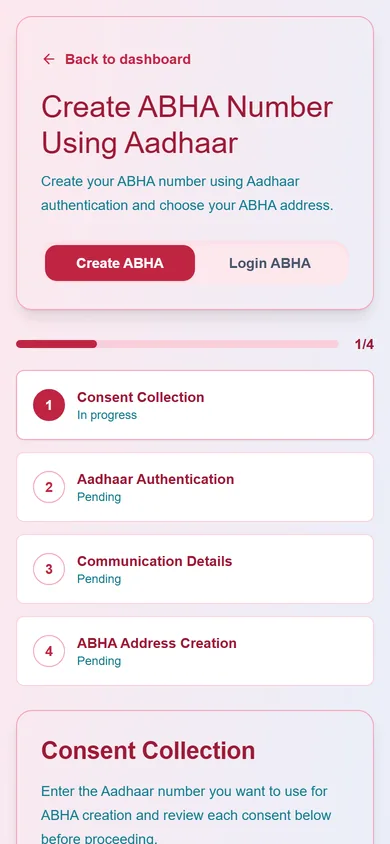
- Create an ABHA with Aadhaar OTP in a guided wizard
- Sign in with your ABHA number, ABHA address, Aadhaar or mobile OTP
- Download or print your ABHA card
- Records shared through ABDM only with your consent
- 07AI Health Intelligence
Your whole health story, summarised in one report
- An executive summary of your record, in plain words
- Chronic conditions, medication history and a progression timeline
- Risks and recommendations to discuss with your doctor
- Clearly marked as AI, never a diagnosis; available where your hospital has switched it on
Prescriptions, reports, admissions, vaccinations, wellness and more. See every feature
From sign-up to your first visit
Five steps, and the paperwork takes care of itself.
- 01
Sign up
In two minutes
Create your account with ABHA, or with your mobile, email or Google. Add an ABHA later if you like.
- 02
Find and book
Any time
Pick a doctor, a date and a slot, in person or by video. Video visits are paid online when you book.
- 03
Check in
On the day
Check in from your phone, enter your vitals, and watch how many patients are ahead of you.
- 04
Consult
With your doctor
In the clinic, or by video from the waiting room. Your doctor already has your vitals.
- 05
Everything after
In your app
Prescription, medicines, reports and the bill arrive in your record. No paper to keep.
Look after the people you care for
Share your record with a son, a daughter or a caregiver, choose exactly what they see, and for how long. When someone shares with you, their care is a tap away.
- Add family by username, email or mobile
- Choose what they see: appointments, reports, bills, live visit status, video consults
- Set how many days the access lasts, and revoke it at any time
- Open the records others have shared with you under "People I look after"
MedChaaya
Family & caregivers
Share what they can see
- Appointments
- Reports
- Bills
- Live visit status
- Video consults
Your record, your rules
Doctors see your records for your care, for a limited time, or when you say yes. And you can always see who looked.
Doctor access you can see
See which doctors can open your records, why, and until when. Access ends on its own after the visit or the hospital stay.
Withdraw at any time
Withdraw a doctor's access, a video consult consent, or sharing on a referral, whenever you want.
A full access log
Every view and change to your record is logged, and you can read the log yourself.
Your approval first
A doctor asking for your documents sends a request; you approve or reject it.
ABHA with consent
Records travel through ABDM only after you consent, and only for the purpose you agreed to.
Calls stay between you
Video and audio travel directly between you and your doctor and are not recorded by MedChaaya.
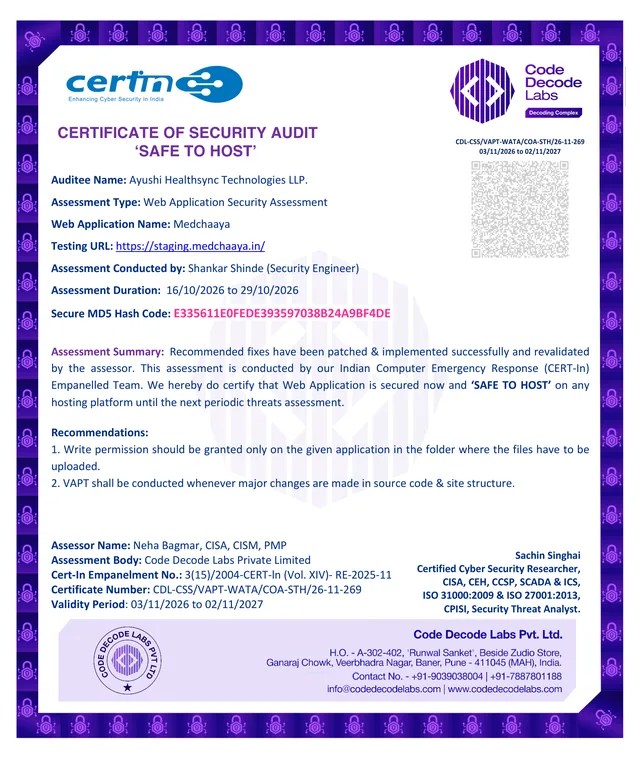
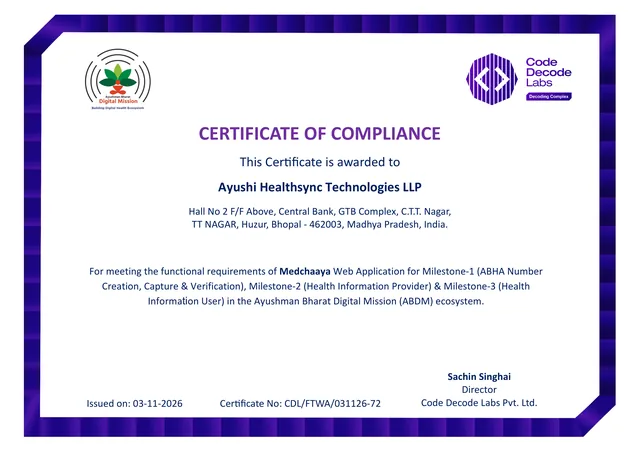
MedChaaya is security audited and ABDM compliant. Medical records are kept for at least three years, and you can ask for deletion subject to the law; see the privacy policy.
Questions, answered
The things patients ask us most. Pick a question to see the answer.
Pick a question
 Chaaya AIOnline · answers in seconds
Do I need to download an app?
- Do I need to download an app?
- No. MedChaaya runs in your phone's browser. Open it once, sign in, and use your browser's "Add to Home screen" option to keep it on your phone like an app. Allow notifications so your phone can ring when your doctor starts a video call.
- Which hospitals and clinics can I use it with?
- Any hospital or clinic that runs on MedChaaya: their appointments, reports, prescriptions and bills appear in your app automatically. Records from anywhere else can be uploaded to your document vault.
- How does the live token work?
- Once you are checked in, your token number appears with how many patients are ahead of you. It refreshes on its own every 30 seconds, so you can wait wherever you are comfortable.
- How do video consultations work?
- Book a video slot and pay the fee online. At the time of the visit, open the waiting room: give consent, check your camera and microphone, and wait. You can see when you are next, and your phone rings when the doctor admits you. You can also send a call-back request, and your doctor calls you. Calls go directly between you and your doctor and are not recorded by MedChaaya.
- Can I pay my bills in the app?
- Video consultations are paid online when you book. For other visits you can see every bill with its line items and download it; pay at the hospital or clinic.
- Is my medical data safe, and who can see it?
- Patients choose what to share and can revoke access. Staff and doctors see only what their role, hospital and permissions allow, each hospital's records are kept separate, and an audit log records who did what. With an on-premise deployment, patient records are stored on your own infrastructure.
- Do patients need an ABHA?
- No. Patients can sign up with email, mobile or Google and add an ABHA later from their profile.
- Can I look after my parents' or children's health?
- Yes. Add a family member or caregiver by their username, email or mobile, choose what they can see (appointments, reports, bills, live visit status or video consults) and for how many days, and revoke it whenever you like. People who share with you appear under "People I look after".
Your health record, ready in two minutes
Use it with any hospital or clinic on MedChaaya, and upload the records you already have.
A doctor with your own clinic? See MedChaaya for clinics
- 01Create your accountSign up with ABHA, or with your mobile, email or Google.
- 02Add it to your home screenOpen the browser menu and choose "Add to Home screen", then allow notifications.
- 03Book your first visitFind a doctor, pick a slot, and check in from your phone on the day.