All your bookings in one list, with the follow-ups your doctor recommends.
Pick a slot and add a note
Reschedule or cancel
Book a recommended follow-up
My Visits: your full consultation history
03
Check-in and live token
Check in from your phone on the day and wait wherever you are comfortable.
Self check-in with your vitals
Your token and how many are ahead
Refreshes every 30 seconds
Today's visit, stage by stage
MedChaaya
Live OPD queue
Refreshes every 30 seconds
Your token
14
3 patients ahead of you
Dr. Kavita Mehta · Room 3
Today's visit
Checked in
Vitals recorded
With the doctor
Prescription and bill
BP118/76Pulse78SpO₂98%
04
Video consultations
A proper waiting room for video visits, and a call-back button instead of phone tag.
Consent, device check, then the waiting room
Your phone rings when the doctor admits you
Send a call-back request
Pay the video fee online when you book
MedChaaya
Video waiting room
Dr. Arjun Rao · 11:00 am
✓ Consent✓ Device checkWaiting room
Camera preview
You are nextThe doctor will admit you shortly
05
Prescriptions and medicines
Every prescription with full instructions, and today's doses by time of day.
Dose, schedule, duration, route and instructions
Prescription PDFs
Today's doses: morning, afternoon, night
Mark each dose as taken
MedChaaya
My medicines
Today's doses
Morning
8:00 am
Metformin 500 mg1 tablet after foodTaken
Telmisartan 40 mg1 tabletTaken
Afternoon
2:00 pm
Vitamin D31 capsuleMark taken
Night
9:00 pm
Metformin 500 mg1 tablet after foodMark taken
06
Lab and radiology reports
Reports appear once they are approved, with the ranges to make sense of them.
Results with reference ranges and flags
Radiology images and reports
Preliminary reports clearly marked
Download any report
MedChaaya
Reports
Lab and radiology
Complete Blood CountApproved by pathologist · 18 Nov
Haemoglobin
11.2 g/dL
12–15
Low
WBC count
7,400 /µL
4k–11k
Normal
Platelets
2.6 lakh/µL
1.5–4.1
Normal
ESR
32 mm/hr
0–20
High
Chest X-ray PA viewRadiology · with imagesPreliminary
Bill INV/25-26/0412Consultation, CBC, X-ray₹1,350
07
Bills
Know what you were charged for.
Line items, discount and net amount
Account summary and ledger
Bill PDFs to download
08
OPD visits
Each outpatient visit with its diagnosis and orders, and the consultation notes to download.
Diagnosis and orders per visit
Consultation notes download
Complaints, history, vitals and treatment
09
Admissions and discharge
If you are admitted, follow the stay and keep the discharge papers.
Current and past admissions with a timeline
Ward and bed during the stay
Discharge summary and discharge slip
MedChaaya
My admission
City Care Hospital
General Ward · Bed 12Discharged
Admitted 10 Nov · Discharged 14 Nov
Admitted
Under treatment
Discharge recommended
Discharged
Discharge summary
Discharge slip
10
Emergency visits
After an emergency visit, the advice, the prescription and when the hospital will call you back.
Emergency discharge advice
Emergency prescription
Hospital call-back time
11
Vaccinations
A digital vaccination certificate you will not lose.
Vaccine, batch and dose number
Next dose due
Download as PDF
MedChaaya
Immunizations
Digital vaccination record
Hepatitis BDose 2 of 3 · Batch HB2291Next dose 12 Feb
TdapDose 1 of 1 · Batch TD8810Complete
Influenza (2025–26)Dose 1 of 1 · Batch FL0921Complete
Download certificate
12
Wellness records
Keep your own readings between visits and download them as a report.
Height, weight, BMI, BP, pulse, SpO₂, temperature
Sleep, steps, water, activity
Smoking, alcohol and women's health
Branded wellness report
13
Document vault
Old reports from anywhere else, kept with the rest of your record.
Upload PDF, JPG or PNG, or take a photo
Give each file a category
Share with the doctors you choose
Search and filter by type
MedChaaya
My documents
Everything you have uploaded
AllReportsPrescriptions
PDFThyroid profile.pdfLab report · 02 Sep
JPGMRI knee report.jpgRadiology · 14 Jul
PNGOld prescription.pngPrescription · 30 Mar
Upload Take photo
14
My Health Report
An AI summary of your whole record, where your hospital has switched AI on.
Executive summary and chronic conditions
Medication history and timeline
Risks and recommendations
Marked as AI, never a diagnosis
MedChaaya
My Health Report
AI Health Intelligence
Executive summary
Blood sugar well controlled over 6 months. Mild anaemia in the last report; follow-up advised.
Chronic conditionsType 2 diabetes · Hypertension
Medication history3 active medicines
Progression timeline12 visits since 2023
Recommendations
• Repeat haemoglobin in 4 weeks
• Discuss iron supplements with your doctor
AI-generated summary for information only. It is not a diagnosis; talk to your doctor.
15
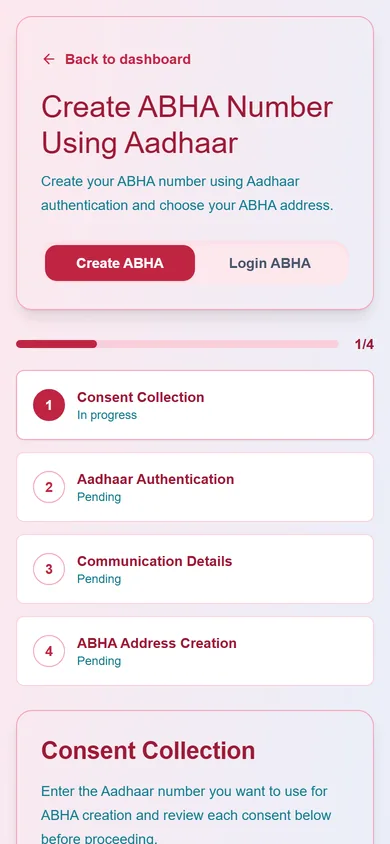
ABHA
Create, link and use your Ayushman Bharat Health Account.
Create an ABHA with Aadhaar OTP
Sign in with ABHA
Download or print the ABHA card
Sync your ABDM profile
16
Family and caregivers
Let family see what you choose, and look after the people who share with you.
Add family by username, email or mobile
Choose what they see and for how long
Revoke at any time
People I look after
MedChaaya
Family & caregivers
Share what they can see
RSRohan ShahSon · access for 90 days
Appointments
Reports
Bills
Live visit status
Video consults
People I look afterOpen records shared with you
+ Add a family member
17
Privacy and consent
See and control who can open your records.
Doctors with access, why and until when
Withdraw access and consents
Approve or reject document requests
A full access log
MedChaaya
Privacy & consent
Who can see your records
Dr. Kavita MehtaOPD visit · until 20 DecWithdraw
Dr. Arjun RaoReferral · until 05 JanWithdraw
Access log
Dr. Mehta viewed CBC report · 18 Nov, 11:02
Lab desk added X-ray report · 18 Nov, 10:40
You shared 2 documents · 17 Nov, 19:15
18
Sign-in options
Use whichever way suits you.
Password
One-time code by mobile or email
Magic link or Google
ABHA
19
Help, feedback and support
Find your way around, and reach the hospital when something is wrong.
Ask Chaaya, a guide to the app (no medical advice)
Raise and follow support tickets
Feedback, complaints and compliments with a rating
See who received copies of your record
Some sections appear only when your hospital or clinic has switched the matching module on (for example admissions, emergency or AI). The people and numbers in the screens are illustrative.
Common questions
Do I need to download an app?
No. MedChaaya runs in your phone's browser. Open it once, sign in, and use your browser's "Add to Home screen" option to keep it on your phone like an app. Allow notifications so your phone can ring when your doctor starts a video call.
Which hospitals and clinics can I use it with?
Any hospital or clinic that runs on MedChaaya: their appointments, reports, prescriptions and bills appear in your app automatically. Records from anywhere else can be uploaded to your document vault.
Will I get reminders and notifications?
With notifications allowed, your phone alerts you to incoming video calls, follow-up reminders and documents that are ready. Today's medicine doses are shown inside the app, where you can mark each one as taken.