
History, notes, prescription and orders in four steps
Open a patient who is already marked ready, with vitals and the complaint recorded. Write the note, build the prescription, order tests and set the follow-up without leaving the screen.
In short
- 01Vitals and complaint already recorded
- 02Templates and quick text for faster notes
- 03Prescription with medication warnings
One consultation, step by step
Scroll through a visit, from the history to the follow-up.
- 01Step 1 / 7
History and vitals
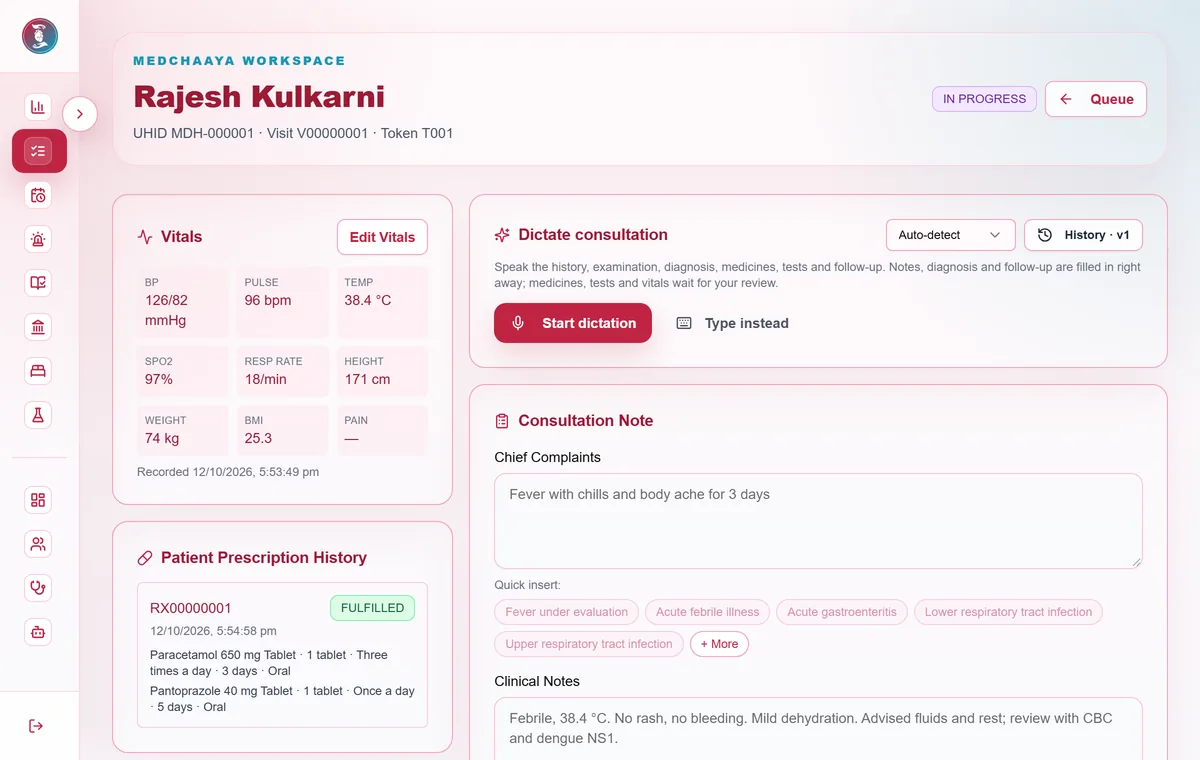
The vitals and chief complaint your desk recorded are waiting. Add the history and a lifestyle and wellness record where it matters.
- Vitals from intake
- Lifestyle and wellness record, including menstrual, pregnancy and menopause fields
- 02Step 2 / 7
The consultation note
Write the note with specialty and note templates and quick-text suggestions, so the common things take one tap.
- Specialty templates
- Quick-text suggestions
- Every earlier version of the note kept
- 03Step 3 / 7
The prescription
Build the prescription from the formulary with dose, frequency, duration and route. Medication warnings appear as you go.
- Formulary lookup
- Prescription templates
- Medication warnings
Priya Nair · T-07 · Consultation
Prescription
✓ History & vitals✓ ConsultationPrescriptionOrdersMedicineDoseFrequencyDaysParacetamol 650 mg tablet1 tablet1-1-1 after food3Cetirizine 10 mg tablet1 tablet0-0-15ORS sachet1 sachetAs needed3+ Search the formulary…Medication warning
Check paracetamol total daily dose.
Follow-up
In 5 days · in person or video · CBC before visit
- 04Step 4 / 7
Orders
Order lab tests, radiology and procedures with a priority of Routine, Urgent or STAT.
- Procedure orders with OPD
- Lab and radiology where those modules are on for your clinic
- 05Step 5 / 7
The follow-up
Set the follow-up date, whether it is in person, by video or either, the reason, and the tests to do before it.
- Goes to your follow-up worklist
- The patient sees it in their app, ready to book
Follow-ups
Who should come back, and when
Awaiting confirmation 3Overdue 2Due soon 5Confirmed 11ClosedMIMohammed IqbalDiabetes review · HbA1c before visitDue 02 DecIn person · Reminded 2×KPKiran PatelBP recheckDue 28 NovVideo · Reminded 1× - 06Step 6 / 7
Dictate instead of typing
Rolling out: dictate with automatic language detection, Hindi, Gujarati or Marathi. Dictated items wait for your review.
- Nothing enters the note without your review
- Voice notes become text and the audio is discarded
- 07Step 7 / 7
Complete the visit
Finish the visit and the prescription, orders and follow-up reach the patient's record and app.
- Prescription in the patient app
- Completed visits create a care record for ABHA sharing
Common questions
What is in the consultation screen?
Four steps: history and vitals, consultation note, prescription and orders. It has specialty and note templates, quick-text suggestions, a prescription builder with formulary lookup and medication warnings, lab, radiology and procedure orders where enabled, and the follow-up in the same visit.
Does the AI make clinical decisions?
No. AI is optional. It summarises and answers questions about records, every output carries a disclaimer, and nothing it produces is applied without the doctor's review.
Which languages does voice dictation support?
Dictation is rolling out with Hindi, Gujarati and Marathi as well as automatic language detection. Dictated items wait for your review before they go into the note.
Open your clinic on MedChaaya
Register as a doctor, set up your clinic in one click, and start seeing patients.
Start your clinic