
Open your clinic on MedChaaya, the same day
Register as a doctor, click “Set up my clinic”, add your receptionist and hours, and you are ready for the first patient.
Welcome, Dr. Neha Joshi
Your practice
Set up my clinic
Creates your clinic, its reception desk and your consulting schedule. Your existing patients and documents stay as they are.
In short
- 01Register with your medical credentials
- 02One click creates the clinic
- 03Your receptionist can start booking today
Setting up your clinic, start to finish
Scroll through setup, from registration to the first patient in the queue.
- 01Step 1 / 6
Register as a doctor
Choose "Doctor" on the sign-up page and enter your licence number, specialisation, state medical council, NMR status, qualifications, years of experience and your clinic address.
- City and state filled in from the PIN code
- You land on your doctor dashboard
- 02Step 2 / 6
Click “Set up my clinic”
One click creates your clinic, its reception desk and your consulting schedule. Patients and documents you already have stay as they are.
- Clinic workspace with its own navigation
- Leave the clinic workspace any time
Welcome, Dr. Neha Joshi
Your practice
Set up my clinic
Creates your clinic, its reception desk and your consulting schedule. Your existing patients and documents stay as they are.
Clinic workspace Reception desk Weekly consulting scheduleSet up in one click - 03Step 3 / 6
Add your receptionist
Create a login for your receptionist (or a nurse/helper) and assign them as the clinic receptionist.
- Front-desk permissions applied for you
- Their own branded workspace
Add staffYour team
Staff
MKMeena KulkarniReceptionistActiveRSRavi SharmaNurse / HelperActivePIPooja IyerReceptionistDeactivatedClinic receptionist
Meena Kulkarni runs the front desk for Dr. Neha Joshi.
- 04Step 4 / 6
Set your hours
Set your weekly hours, slot length and patients per slot. Add any leave you already know about.
- Slots for booking come from these hours
Add exceptionMy schedule
Weekly consulting hours
Mon10:00 – 14:0017:00 – 20:0015 min · 1 per slotTue10:00 – 14:0017:00 – 20:0015 min · 1 per slotWed10:00 – 14:0015 min · 1 per slotThu10:00 – 14:0017:00 – 20:0015 min · 1 per slotFri10:00 – 14:0017:00 – 20:0015 min · 1 per slotSat10:00 – 13:0015 min · 1 per slotLeaveFri 12 Dec · full day
BlockTue 16 Dec · 17:00–18:00
Extra sessionSun 21 Dec · 10:00–12:00
- 05Step 5 / 6
Take the first booking
Your receptionist books from your open slots or adds a walk-in. Patients can also book from the MedChaaya patient app.
- No double-booking
- New patients get an email to set up their account
RegisterPatients
Find or register a patient
Search by UHID, name or email…CL-000214Priya NairF · 34 · B+priya.n@abdmCL-000215Mohammed IqbalM · 52 · O+—CL-000216Ananya IyerF · 27 · A+ananya27@abdmNew patients get an email with a secure link to set up their MedChaaya account.
- 06Step 6 / 6
See your first patient
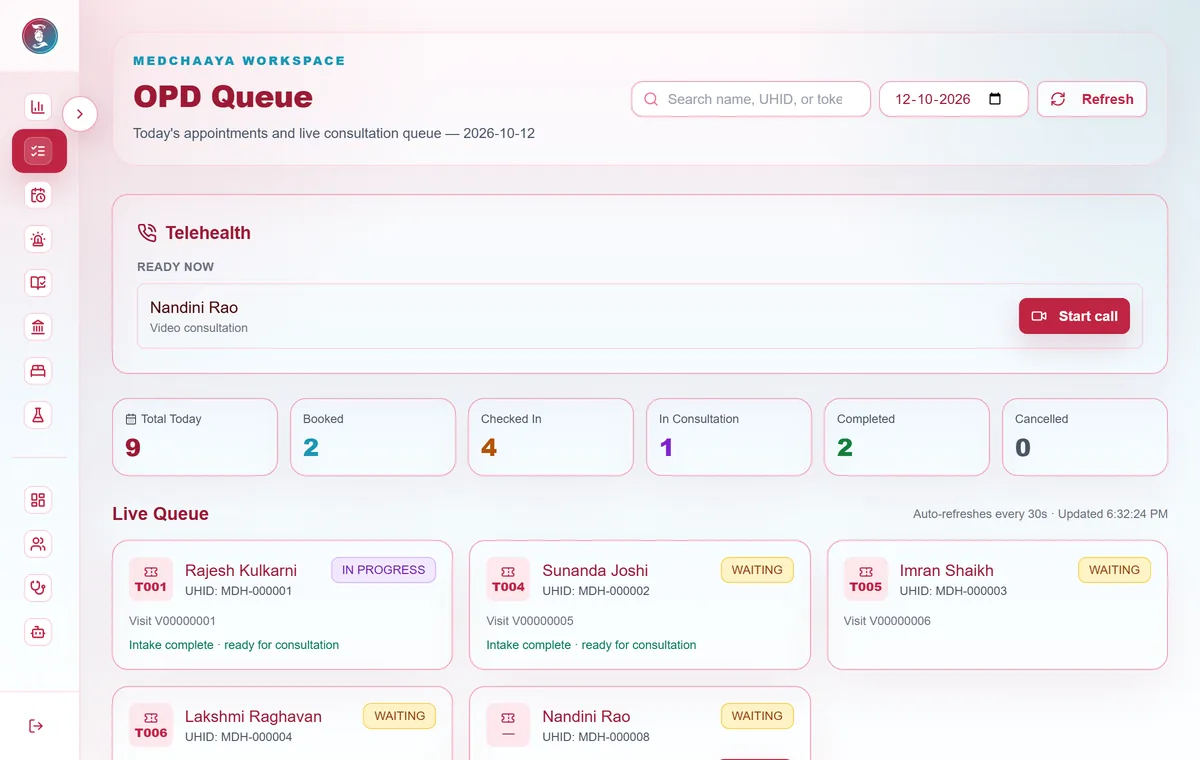
The patient is checked in, vitals recorded and marked ready. Open the visit from your queue.
- Token queue with intake done
- Consult in person or by video
Common questions
How do I set up my clinic?
Register as a doctor with your licence number, specialisation, state medical council, qualifications and clinic address. Then click "Set up my clinic": MedChaaya creates your clinic, its reception desk and your consulting schedule. Your existing patients and documents stay as they are.
What does it cost?
Create your doctor account to see the current options for your clinic, or talk to us. Video consultations, the AI assistant and voice dictation can be added when you need them.
Do I need to install anything?
No. MedChaaya runs in the browser on a computer, tablet or phone, for you and your receptionist.
Open your clinic on MedChaaya
Register as a doctor, set up your clinic in one click, and start seeing patients.
Start your clinic