Skip to content

A front desk your receptionist can run on their own

Your receptionist gets their own workspace for registrations, bookings, walk-ins and the token queue, so every patient reaches you with vitals and the complaint already recorded.

Front desk · Dr. Neha Joshi

Reception

Doctor isAvailableUnavailableOn leave
Register
Walk-in
Book
Queue

OPD queue

Drag to reorder
T-09Sunita VermaVitals doneReady for doctor
T-10Rahul DesaiPriority · elderlyMark ready
T-11Ananya IyerWalk-inMark ready

In short

  • 01Their own login, branded with your clinic
  • 02Walk-ins get a token straight away
  • 03Patients reach you with intake done
01

Your receptionist's login

Create a login for your receptionist, or a nurse/helper, and assign them as the clinic receptionist. Front-desk permissions are applied for you.

  • Email, username, phone and designation
  • Activate or deactivate at any time

Your team

Staff

Add staff
MKMeena KulkarniReceptionistActive
RSRavi SharmaNurse / HelperActive
PIPooja IyerReceptionistDeactivated

Clinic receptionist

Meena Kulkarni runs the front desk for Dr. Neha Joshi.
02

The reception dashboard

Branded with your clinic's name and "Front desk · Dr …". Live counts, the next patient, and quick actions for the things a desk does all day.

  • Register, walk-in, book, queue
  • Set the doctor available, unavailable or on leave
  • "Next up" and "Mark ready"

Front desk · Dr. Neha Joshi

Reception

Doctor isAvailableUnavailableOn leave
Register
Walk-in
Book
Queue

OPD queue

Drag to reorder
T-09Sunita VermaVitals doneReady for doctor
T-10Rahul DesaiPriority · elderlyMark ready
T-11Ananya IyerWalk-inMark ready
03

Register patients without duplicates

Search by UHID, name or email first. Register a new patient, or add one who already has a MedChaaya account.

  • Date of birth, blood group, emergency contact
  • New patients get an email with a secure link to set up their account

Patients

Find or register a patient

Register
Search by UHID, name or email…
CL-000214Priya NairF · 34 · B+priya.n@abdm
CL-000215Mohammed IqbalM · 52 · O+—
CL-000216Ananya IyerF · 27 · A+ananya27@abdm

New patients get an email with a secure link to set up their MedChaaya account.

04

Book, reschedule, cancel

Slots come from your schedule, so nobody is double-booked. Every change carries a reason.

  • Book in person or by video
  • Reschedule to an open slot with a reason
  • Cancel with a reason
05

Walk-ins and tokens

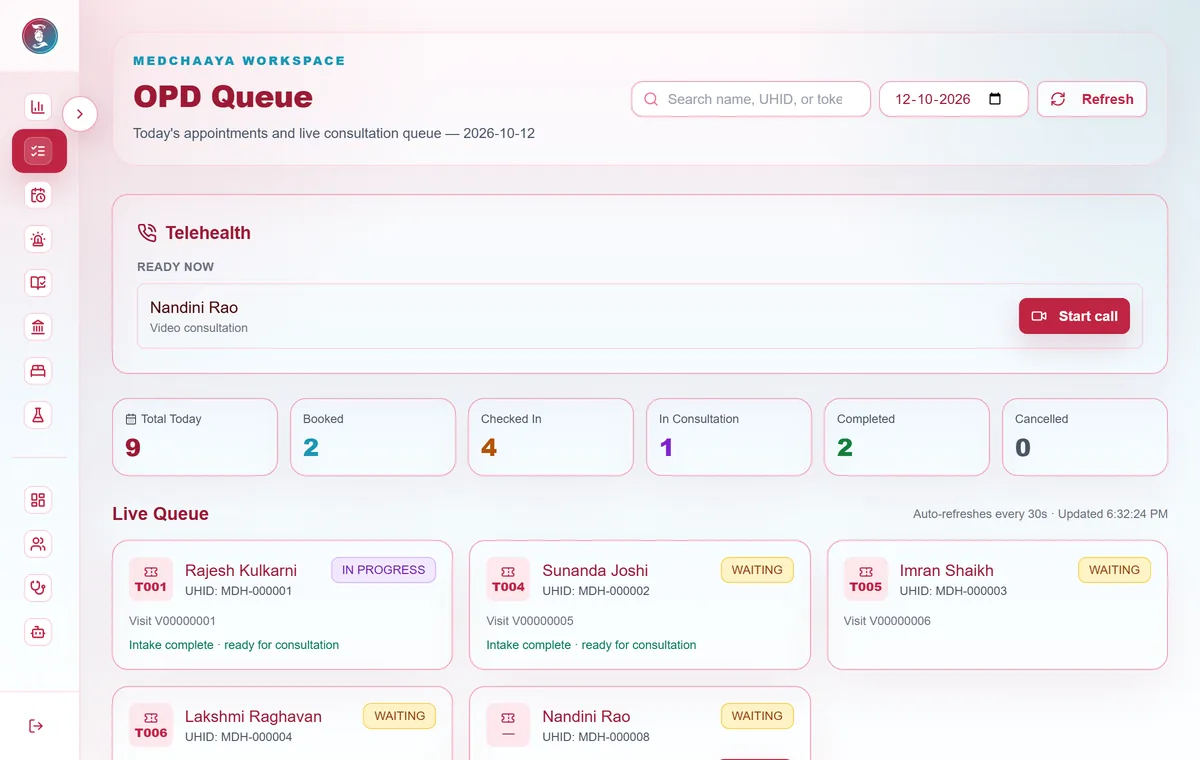
Walk-ins get a token instantly. The queue shows every token, with card and table views and search.

  • Drag to reorder, also on touch
  • Move up or down
  • Priority with a recorded reason
  • Mark no-show, or move to another doctor
MedChaaya doctor OPD queue: a teleconsultation ready to start, today's counts by status, and live queue cards with tokens and intake status
06

Intake before the doctor

Record vitals and the chief complaint at the desk and mark the patient ready for the doctor.

  • Height, weight, temperature, pulse, respiratory rate, BP, SpO₂, pain score
  • Chief complaint and intake notes
  • "Ready for doctor" flag
07

Documents at the desk

Upload an intake document to today's visit. The desk sees only the title and date of clinical documents, not their contents.

  • Attached to today's visit
  • Clinical contents stay with the doctor
08

Video fees at the counter

If a video booking is still awaiting online payment, the desk can collect it and issue a counter receipt.

  • Counter receipt
  • No credit for video bookings

Common questions

Can my receptionist use it?

Yes. Create a login for your receptionist (or a nurse or helper) and assign them as the clinic receptionist. They get their own front desk to register patients, book appointments, add walk-ins, check patients in with vitals and manage the token queue.

How do patients book with my clinic?

Your receptionist can book appointments from your schedule's open slots or add walk-ins. Patients can also book from the MedChaaya patient app, in person or by video, check in from their phone and see how many patients are ahead of them.

How does the token queue work?

Every checked-in patient gets a token. The desk can drag to reorder, mark priority with a reason, mark no-shows and mark a patient ready for you once vitals and the chief complaint are recorded. You see who is waiting, who is ready and who is in consultation.

See all questions