
One day at your clinic, from the first token to the last follow-up
Follow a day as it happens: the clock turns and the screen changes as you read. Your receptionist and you work from the same record all day.
Clinic workspace
Today at Shree Clinic
Waiting
6
Ready for you
2
In consultation
1
Appointments
18
Ready for you
In short
- 01The desk does intake before you
- 02You open patients who are ready
- 03Follow-ups and video fit into the same day
One day at your clinic, from first patient to last
- 09:0009:00
The desk opens
Your receptionist signs in to the front desk and sets you as available.
- Today's appointments and live counts
- Quick actions: register, walk-in, book, queue
Front desk · Dr. Neha Joshi
Reception
Doctor isAvailableUnavailableOn leaveRegisterWalk-inBookQueueOPD queue
Drag to reorderT-09Sunita VermaVitals doneReady for doctorT-10Rahul DesaiPriority · elderlyMark readyT-11Ananya IyerWalk-inMark ready - 09:2009:20
Patients arrive
Booked patients check in; walk-ins get a token straight away.
- Find patients by UHID, name or email
- New patients get an email to set up their account
- No duplicate bookings in the same slot
RegisterPatients
Find or register a patient
Search by UHID, name or email…CL-000214Priya NairF · 34 · B+priya.n@abdmCL-000215Mohammed IqbalM · 52 · O+—CL-000216Ananya IyerF · 27 · A+ananya27@abdmNew patients get an email with a secure link to set up their MedChaaya account.
- 09:3509:35
Intake before you
Vitals and the chief complaint are recorded at the desk, and the patient is marked ready for you.
- Height, weight, temperature, pulse, BP, SpO₂, pain score
- Intake notes and documents
- Priority patients carry a reason
Clinic workspace
Today at Shree Clinic
Waiting
6
Ready for you
2
In consultation
1
Appointments
18
Ready for you
T-07Priya NairFever, 3 days · BP 116/74T-08Mohammed IqbalFollow-up · diabetes review - 10:0010:00
Consultations
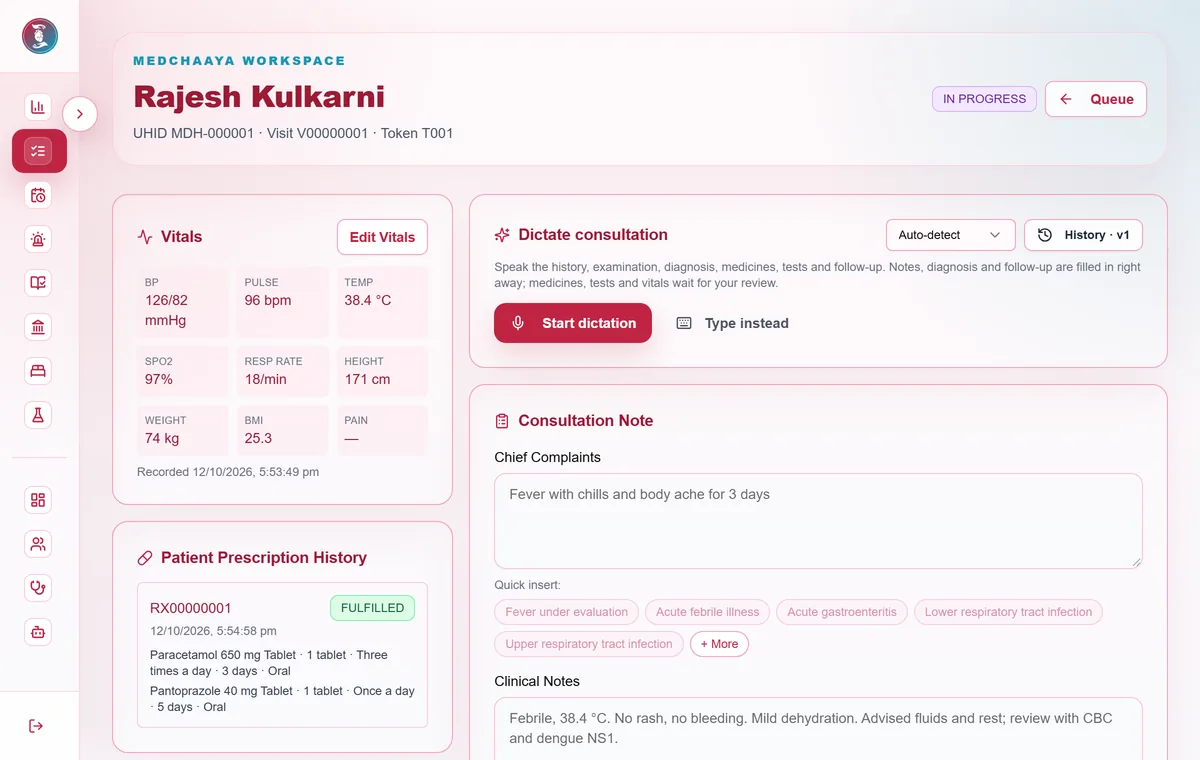
Open the next ready patient and work through history, notes, prescription and orders.
- Templates and quick-text suggestions
- Prescription builder with medication warnings
- Lab, radiology and procedure orders where enabled
- 13:3013:30
Video follow-ups
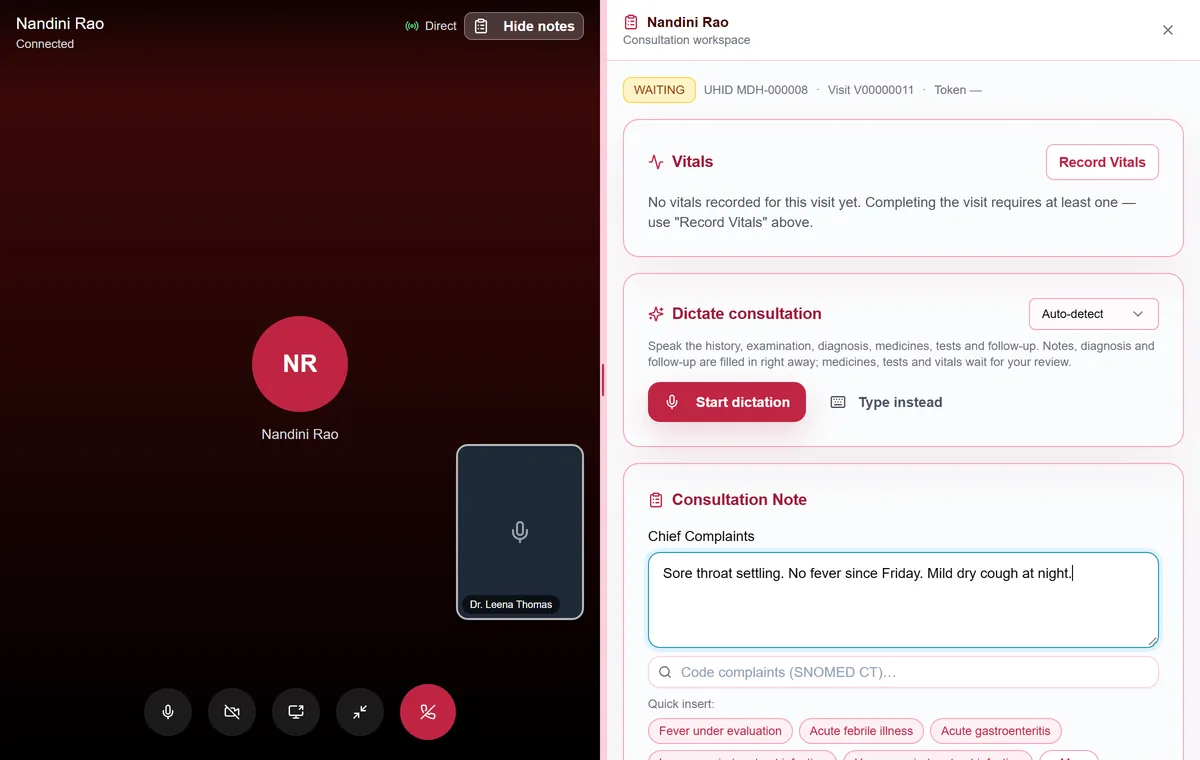
Between in-person patients, call the patients booked for video.
- The patient's phone rings when you start
- Your notes panel stays beside the video
- Video notes are saved as a draft until you approve them
- 18:3018:30
Follow-ups for later
Confirm the follow-ups you set today, so patients are reminded.
- Overdue and due-soon lists
- In person, by video or either
Follow-ups
Who should come back, and when
Awaiting confirmation 3Overdue 2Due soon 5Confirmed 11ClosedMIMohammed IqbalDiabetes review · HbA1c before visitDue 02 DecIn person · Reminded 2×KPKiran PatelBP recheckDue 28 NovVideo · Reminded 1× - 19:0019:00
Tomorrow's hours
Block an hour, add an extra session, or mark a day of leave.
- Weekly hours per weekday
- See affected bookings before you save
Add exceptionMy schedule
Weekly consulting hours
Mon10:00 – 14:0017:00 – 20:0015 min · 1 per slotTue10:00 – 14:0017:00 – 20:0015 min · 1 per slotWed10:00 – 14:0015 min · 1 per slotThu10:00 – 14:0017:00 – 20:0015 min · 1 per slotFri10:00 – 14:0017:00 – 20:0015 min · 1 per slotSat10:00 – 13:0015 min · 1 per slotLeaveFri 12 Dec · full day
BlockTue 16 Dec · 17:00–18:00
Extra sessionSun 21 Dec · 10:00–12:00
Common questions
Can my receptionist use it?
Yes. Create a login for your receptionist (or a nurse or helper) and assign them as the clinic receptionist. They get their own front desk to register patients, book appointments, add walk-ins, check patients in with vitals and manage the token queue.
How does the token queue work?
Every checked-in patient gets a token. The desk can drag to reorder, mark priority with a reason, mark no-shows and mark a patient ready for you once vitals and the chief complaint are recorded. You see who is waiting, who is ready and who is in consultation.
How are follow-ups tracked?
Follow-ups you set in a visit go to a worklist: awaiting confirmation, overdue, due soon, confirmed and closed. Patients are reminded once you confirm, and you can see how many times each one has been reminded.
Open your clinic on MedChaaya
Register as a doctor, set up your clinic in one click, and start seeing patients.
Start your clinic